Prevector Studio
Built for how accountants actually work.
Every feature exists because the manual alternative wastes your time. Explore the platform that takes you from trial balance to filed financial statements.

NL GAAP Integration
NL GAAP knowledge, built in.
Prevector Studio queries the official NL GAAP (RJ) standards directly during every generation run through integrated MCP servers, not from LLM training data. The system accesses the actual RJ guidelines at the paragraph level, ensuring that every disclosure, classification, and policy description is grounded in the official standard.
Entity size classification (micro, small, medium, or large) is applied automatically based on your data, so the correct reporting requirements are used from the start. A compliance reviewer agent verifies every section against applicable RJ guidelines before the draft is finalised.
Powered by the same MCP servers available as a standalone product for your own AI workflows
Currently supports up to medium size. Large entities will be supported in future versions.
Standards database updated when RJ publishes changes, no manual maintenance
NL GAAS Compliance
Compilation engagement, by the book.
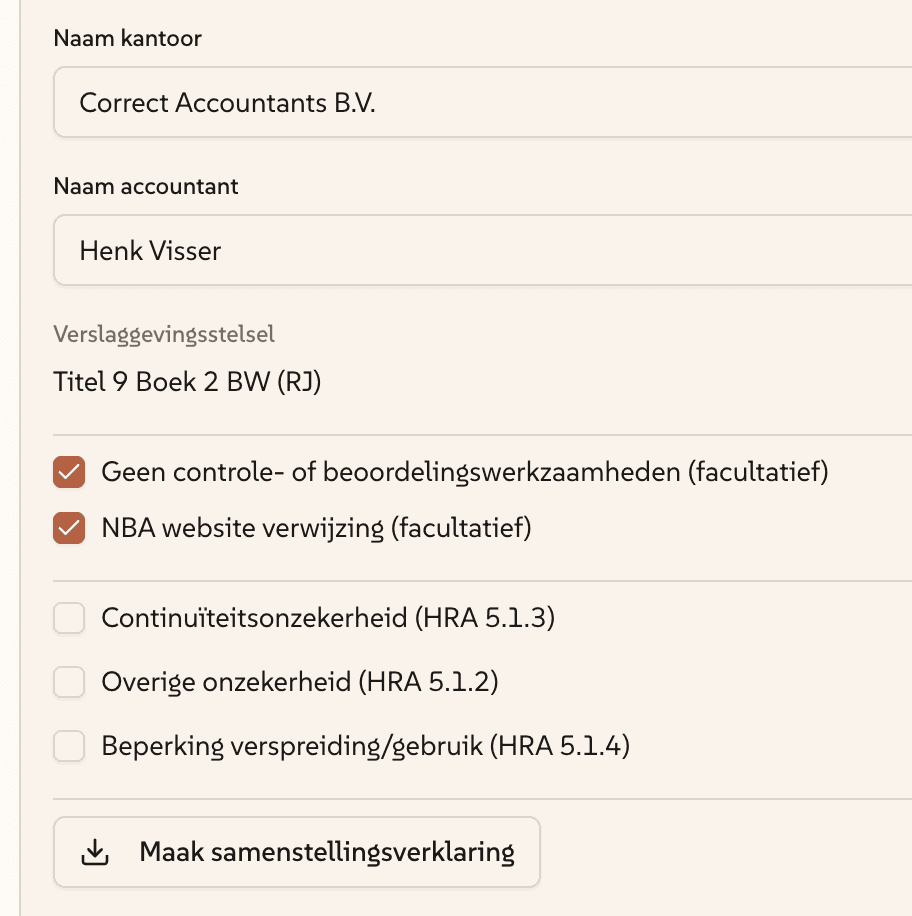
Prevector Studio supports the preparation of financial statements under compilation engagements in accordance with NV COS 4410 (Standard 4410) and NBA-handreiking 1136. The platform generates the management representation letter and compilation report as part of the engagement workflow.
Compliance with NL GAAS is an optional status that firms can enable per engagement, recognising that not every preparation requires a formal compilation opinion. When enabled, the relevant requirements from NV COS 4410 are applied throughout the process.
Toggle on/off per engagement, no forced workflow for informal preparations
AI prepares the LOR and compilation report based on engagement and official template data
NL GAAS standards accessed through the same MCP infrastructure as NL GAAP
AI Mapping
AI maps every account. You confirm.
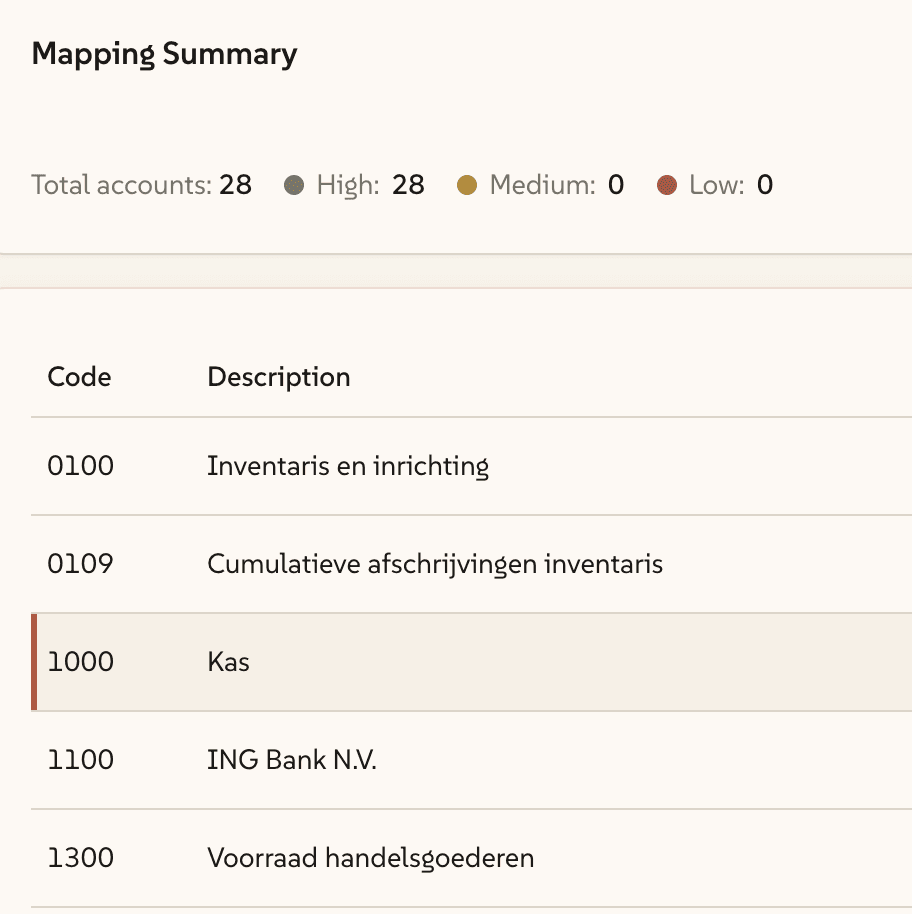
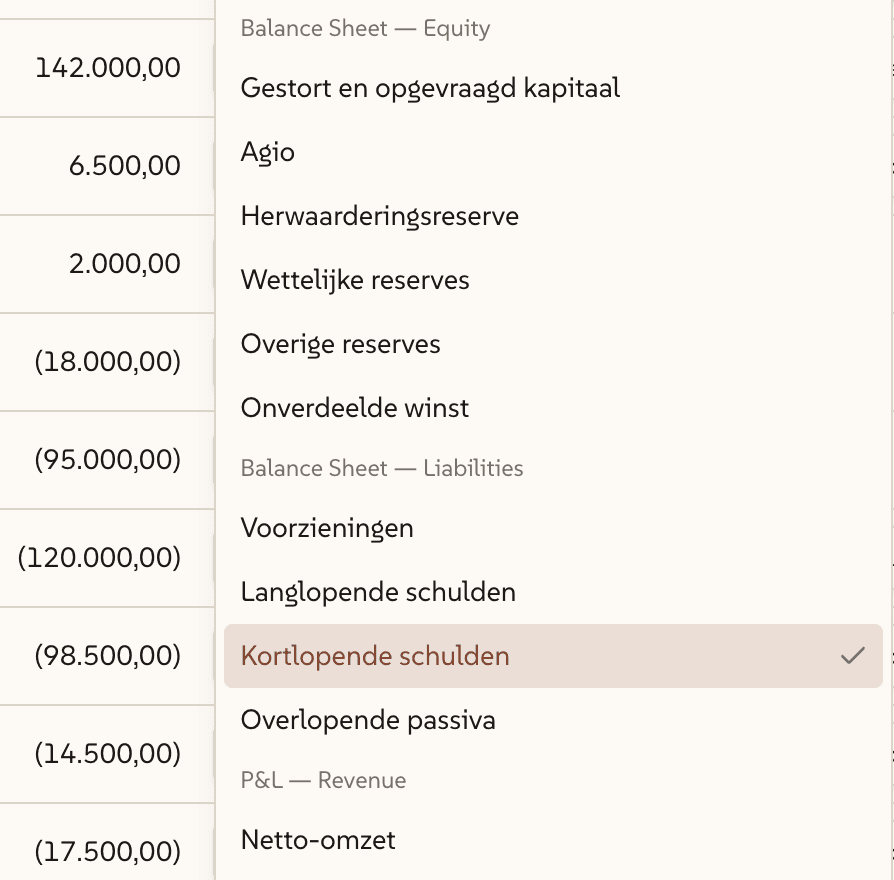
Upload your trial balance and let AI classify every account against the Dutch Taxonomy. The mapper proposes two dimensions per account: the primary statement category and the disclosure sub-category, using the exact structure required for SBR filing.
Every mapping is presented in an interactive review table. Confidence scores show where the AI is certain and where it needs your input. Cascade dropdowns filter options by what the taxonomy actually allows, the AI selects from official taxonomy menus, never from free text. Upload a chart of accounts alongside the trial balance to improve accuracy.
Accepts CSV and Excel, with optional chart of accounts and prior year statements as context
Confirmed mapping drives all downstream computation, disclosures, and SBR tagging
Several logical and compliance checks are realtime updated and the entity size classification is proposed
SBR Taxonomy Embedded
SBR-ready from the first step.
Because account mapping aligns to the Dutch Taxonomy from the very first step, iXBRL tagging is a direct operation, not a separate translation layer added after the fact. Every line item, every disclosure, every subtotal carries its taxonomy reference throughout the entire workflow.
The export pipeline generates a complete iXBRL Report Package: styled XHTML with embedded iXBRL tags, an entity-specific extension taxonomy, KVK filing metadata, and conformance validation, all assembled into the .xbri format required for electronic filing. The package is validated against SBR latest conformance rules before download.
Output format: .xbri Report Package for direct filing at KVK
Extension taxonomy auto-generated for entity-specific line items not in the standard taxonomy
DOCX export available from the same content, no reformatting between outputs
Report Generation & Editor
Edit everything in one place.
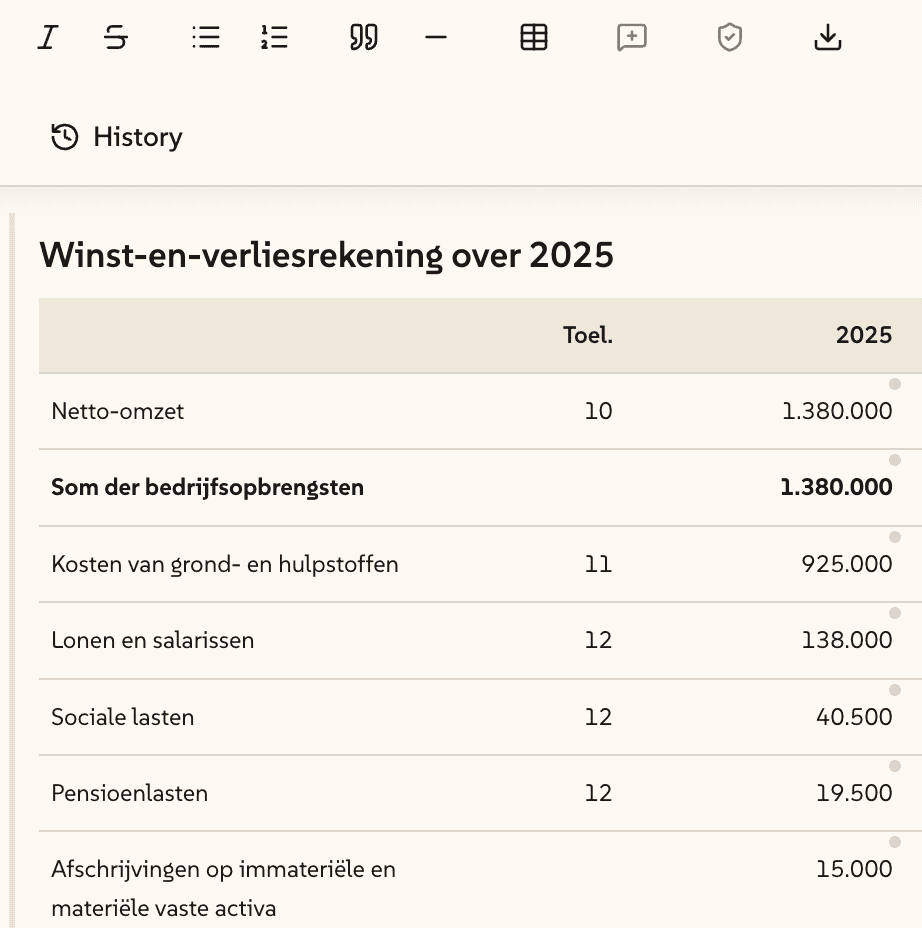
Financial statements are generated directly into a professional rich-text editor built. Every section, from the balance sheet to the final disclosure note, is editable in a single workspace. No exporting to Word to make changes. There is a built-in AI editor that can edit all text and comments for you.
All financial figures are computed deterministically from your confirmed mapping and trial balance data. The AI never estimates, rounds, or invents numbers. Primary statements, disclosure tables, and movement schedules are calculated in code. AI agents contribute only the qualitative content: policy descriptions, disclosure narratives, and compliance commentary. Placeholders mark any section where additional data is needed, and a status bar tracks how many remain.
Use the AI editor to quickly improve, change or complement text.
Placeholder system tracks incomplete sections with a status bar, nothing gets missed
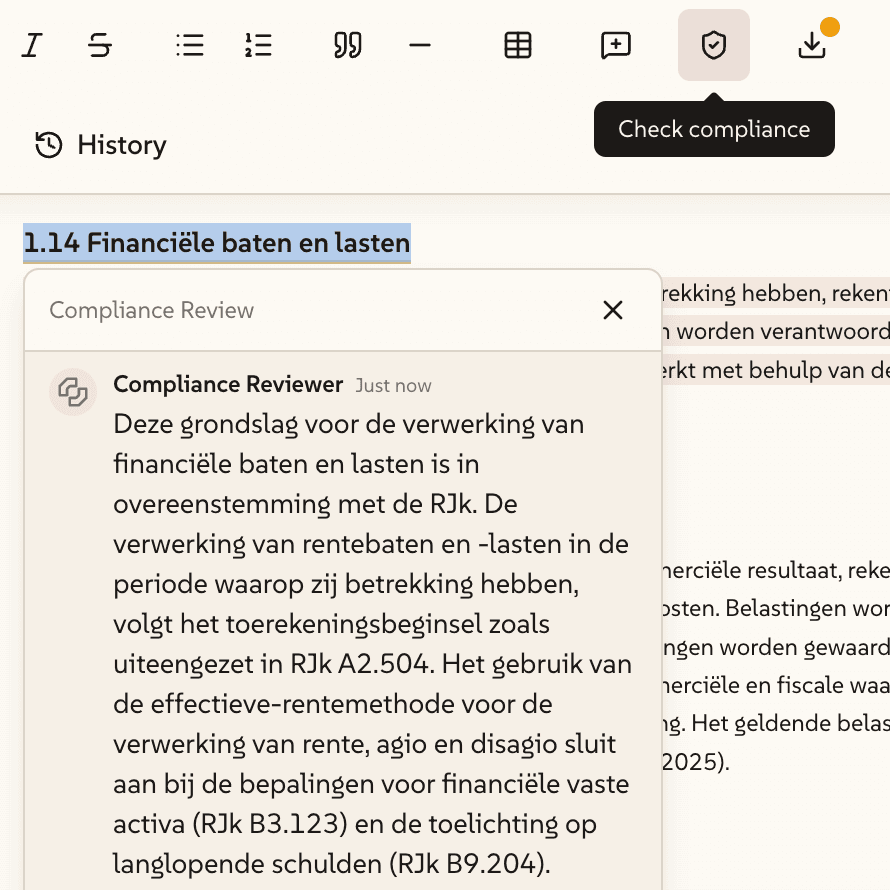
Perform a compliance check for a specific section by the AI compliance agent
Analyse & Advice Dashboard
Insight beyond the numbers.
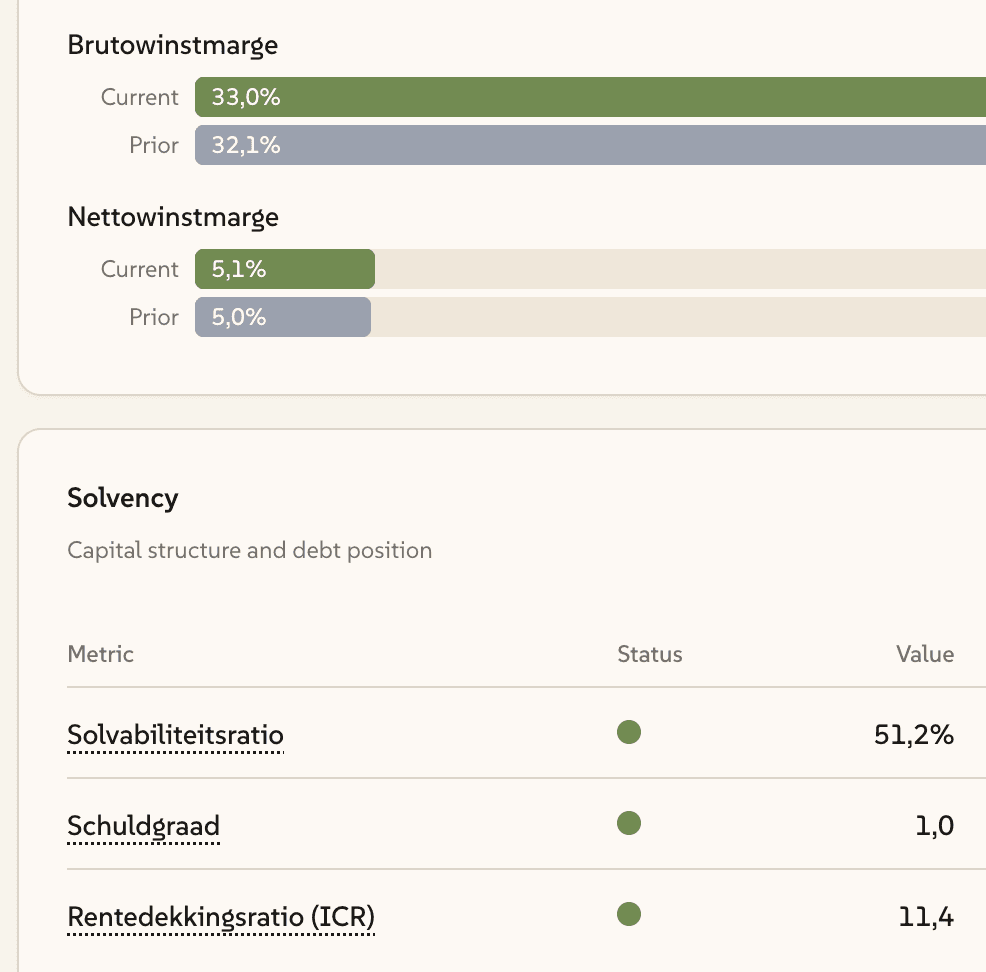
Prevector Studio doesn't just generate statements, it analyses them. The platform produces a management summary with key financial metrics, ratio analysis, and trend observations based on your data. This gives firms a structured starting point for the advisory conversation that follows every engagement.
The dashboard view presents highlights at a glance: liquidity, solvency, profitability, and working capital indicators with year-on-year comparisons where prior year data is available. AI generated commentary provides a draft narrative that accountants can refine before sharing with clients.
Rich metrics dashboard covering all key metrics and analysis
AI generated advisory report with narrative to be used for your advisory needs
NL GAAS continuity indicators built in, so this important step is prepared for you
Intelligent Agents Across the Platform
AI that works like your best junior.
Prevector Studio doesn't use AI in one place, it runs specialised agents across the entire workflow, each with access to the tools and context they need to do their job well. Writer agents drafts every text-heavy section in the compilation file: accounting policies, disclosure narratives and explanatory notes. It doesn't guess, it searches the web for company-specific information and queries NL GAAP standards through Prevector MCP server to ground every paragraph in the right context.
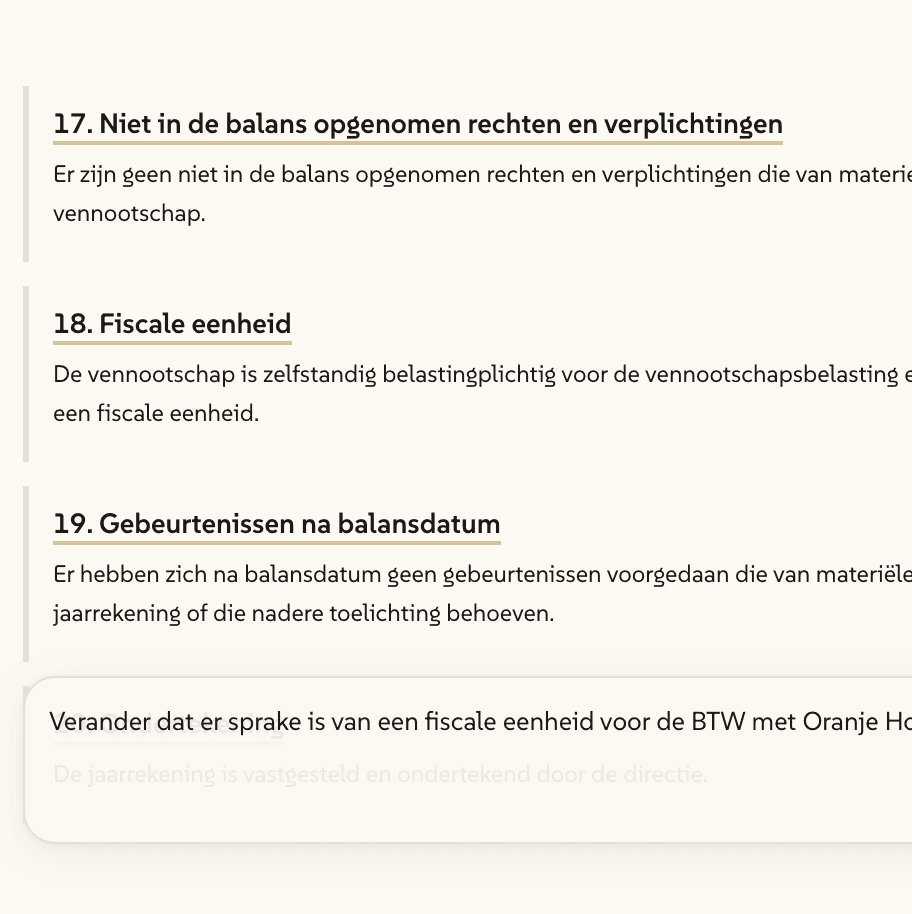
Company data is fetched directly from the KVK API, so entity details, SBI codes, and legal form are populated automatically, no manual lookup. Inside the editor, an AI assistant helps you refine, rewrite, or extend any section inline. And when you need a deeper check on a specific section, a dedicated compliance agent performs a targeted review against the applicable RJ guidelines, on demand, not just at the end of the process.
Each agent has scoped tool access: KVK API, web search, NL GAAP MCP, NL GAAS MCP, no single monolithic prompt
In-editor AI assistant for inline text editing, rewriting, and comment responses
On-demand compliance deep dive per section, call the reviewer where you need it, not just at the end

Quality & Compliance Checks
Every section checked before you sign.
A compliance reviewer agent verifies every section of the generated statements against applicable RJ guidelines, flagging gaps, missing disclosures, and areas requiring additional information. Results appear as structured comments linked to the specific section they relate to, not as a generic checklist disconnected from the content.
A comments tracker provides a clear overview of all open items: compliance flags, internal review notes, and placeholder items. The tracker shows status per item so nothing is missed before finalisation and export.
Comments linked to specific content sections, click a flag, jump to the issue
Status tracking per item: open, resolved, deferred, with full audit trail
Export to iXBRL blocked until critical compliance items are resolved